You are not alone if, after a demanding workday, your eyes appear red, dry, or exhausted. Staring at a computer, tablet, or phone for extended periods of time can lead to dry eyes and eye fatigue. You may blink less frequently when focusing on a screen, which speeds up the evaporation of tears. Redness, burning, scratchiness, and blurred vision are all signs of dry eye.
The good news is that a few simple workplace habits can make your eyes more comfortable and help protect your vision.
What Causes Your Eyes to Turn Red After Work?
Although there are a number of reasons why people get red eyes at work, dry eyes and eye strain are frequently linked to this condition. Long-term use of digital screens can cause eye fatigue and discomfort, although they do not always cause eye injury. Because they can enhance tear evaporation, air conditioning, fans, heating, smoke, dust, and dry conditions can exacerbate the issue. Wearing contact lenses may also make dry eye symptoms more likely. But do not think screen tiredness is the only cause if redness occurs frequently. Persistent redness should be evaluated by a specialist because it may have another cause.
Follow the 20-20-20 Rule
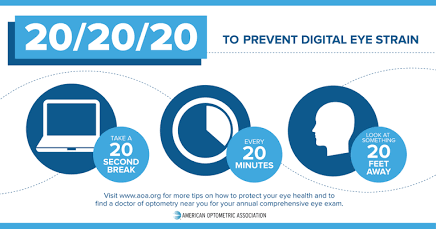
One of the simplest ways to reduce screen-related eye fatigue is the 20-20-20 rule.
Every 20 minutes, stop looking at your screen and focus on something about 20 feet away for at least 20 seconds. This gives your eyes a chance to relax. The National Eye Institute recommends this approach for people who spend significant time using computers and other screens.
Set a reminder on your computer or phone if you tend to become absorbed in your work. These short breaks don’t have to interrupt productivity. You can use them to stretch, take a sip of water, or briefly look out a window.
Remember to Blink
It sounds simple, but blinking is important. Blinking spreads tears across the surface of your eyes and helps keep them comfortable.
When you’re concentrating on a screen, your blinking pattern may change. Making a conscious effort to blink fully and regularly can help reduce dryness.
If your eyes start feeling gritty, burning, or unusually dry, don’t simply push through the discomfort. Look away from the screen, blink several times, and give your eyes a brief rest.
Improve Your Workspace
Your work environment can have a significant effect on eye comfort.
Start by reducing glare. Bright windows, overhead lights, and reflections on your monitor can make your eyes work harder. Adjust the position of your screen or lighting to minimize reflections and uncomfortable brightness. Computer-workstation guidance also recommends positioning the monitor so that you’re looking slightly downward rather than upward.
Keep your screen at a comfortable viewing distance and adjust text size rather than leaning forward to read small characters.
If the room is very dry, improving humidity may also help. Similarly, try not to have an air-conditioning or fan vent blowing directly toward your face, since moving air can worsen dryness.
Use Artificial Tears When Appropriate
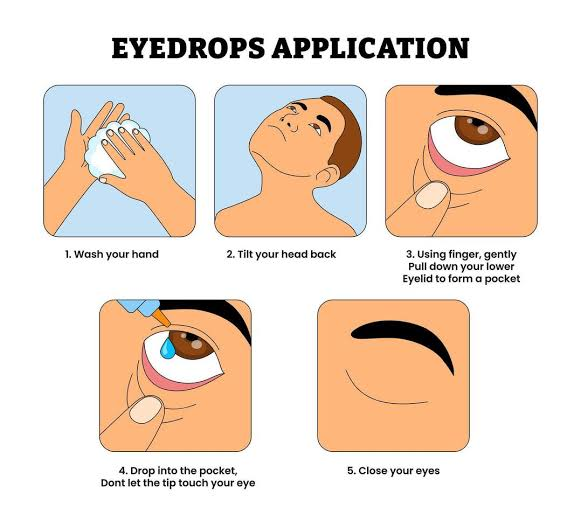
If workplace dryness is a recurring problem, over-the-counter artificial tears may provide relief for mild dry-eye symptoms. The National Eye Institute lists artificial tears as a common treatment for mild dry eye.
However, eye drops are not a substitute for finding out why your eyes remain red. If you need drops frequently or symptoms continue despite basic measures, speak with an eye-care professional.
Avoid using someone else’s eye drops, and don’t assume that every product marketed to “get the red out” is appropriate for regular use.
Take Care of Your Contact Lenses
Contact lens wearers should be particularly careful when experiencing red eyes.
Wash your hands before handling lenses, follow proper cleaning and replacement instructions, and don’t ignore unusual redness or discomfort. Contact-lens-related infections can affect the cornea, so significant symptoms should be assessed promptly.
If your eyes become painful, your vision changes, or redness becomes severe, remove contact lenses and seek professional medical attention rather than continuing to wear them.
Don’t Forget Your Overall Eye Health
Protecting your eyes at work is only one part of maintaining healthy vision.
When outdoors, wear sunglasses that block 99–100% of UVA and UVB radiation. Protective eyewear is also important when your job or hobbies expose your eyes to dust, chemicals, flying particles, or other hazards.
Getting enough sleep and staying hydrated can also support overall comfort. If headaches, tired eyes, or recurring eye strain continue, an eye examination may be worthwhile. The National Eye Institute notes that eye strain and headaches, particularly after reading, screen use, or driving, can be signs that an eye exam is needed.
Recognize When Medical Help Is Needed for Red Eyes A lengthy workday is not always the cause of red eyes. Seek urgent eye care if redness is accompanied by intense eye pain, a change in vision, significant blurring, very red and watery eyes, or an object stuck in the eye. These signs may point to a more serious issue. If the redness persists for a long time, keeps coming back, or interferes with your daily activities, you should also schedule an eye checkup.
A Simple End-of-Work Eye Routine
Before finishing your workday, take a minute to give your eyes a break:
- Look away from your screen and focus on something in the distance.
- Blink slowly several times.
- Check that your eyes aren’t being exposed directly to a fan or air-conditioning vent.
- Remove contact lenses according to your eye-care professional’s instructions.
- Step away from screens for a while instead of immediately switching from your computer to your phone.
Small habits can make a meaningful difference when repeated every day.
Final Thoughts
Red eyes after work are often a sign that your eyes need more rest and moisture, particularly if you spend hours concentrating on digital screens. Regular breaks, frequent blinking, better lighting, a comfortable workstation, and sensible contact-lens habits can help reduce irritation and dryness.
Most importantly, don’t dismiss persistent or severe redness as “just screen time.” Your eyes are too important to ignore. If symptoms continue, worsen, or occur alongside pain or vision changes, get advice from an eye-care professional.
A healthier workday doesn’t require abandoning screens—it simply means giving your eyes the breaks and protection they need.